CAIA (say it KAY-uh) is an AI NetSuite expert that works inside your account — answering questions, building saved searches, creating live reports and dashboards, and driving your NetSuite screen right alongside you.
Not a chatbot. A NetSuite consultant on your team.
Catalyst AI Agent · v2.0
CAIA/ "KAY-uh" /
Catalyst AI Agent · NetSuite consultant & operator
CAIA — officially the Catalyst AI Agent — is an expert NetSuite consultant and operator that works right inside your account. CAIA can see your live environment the moment it opens and does not just advise; CAIA does the work side by side with your team. CAIA is also a deep Catalyst product specialist, built to troubleshoot and fix issues across the Catalyst products running on your account.
Read and write — safely. CAIA can run SuiteQL, pull records and File Cabinet files, check what is deployed, create and update records, push mass updates across hundreds of rows, build saved searches, run one-click account health checks, generate Word, Excel, PDF, and PowerPoint deliverables, take voice and screen-share input, and drive your live NetSuite screen in Browser Operator mode.
Safety is the point. CAIA is read-only by default. Every write action shows a preview and commits nothing until you confirm; large batches can carry a 24-hour undo; and every capability is configurable and clearly gated by your admins and by NetSuite's own permissions.
CAIA should say when it is confident and when it is guessing. When a question is beyond AI, CAIA says so and hands it off with the full context already attached — so the team picks up at step five, not step one.
Frontier reasoning AITenant isolatedRead-only by defaultUnlimited conversationsSub-second streaming70+ languages
Browser Operator · Available now
CAIA does not just advise. CAIA drives NetSuite for you.
The biggest leap yet: CAIA opens a real, logged-in NetSuite session right beside your chat and works the screen like a consultant sitting next to you — navigating, reading, flagging, and capturing proof. Watch it happen, live.
A senior consultant for the work that needs clicking.
Ask in plain English. CAIA opens the live NetSuite UI, navigates to the record, reads what the API can't see, flags what's wrong, captures proof, and hands you a report — narrating every step so you're never guessing.
Drives the real screenNavigates, opens records, and works multi-step tasks end-to-end.
Sees what the API can'tRendered screens, subtabs, and UI-only values — read live.
Captures & verifiesAuto-screenshots key fields and proves the work landed.
Reports backOne-click branded PDF of the entire session.
100% available now with CAIA
app.netsuite.com · caia live session
Operator active
Open invoice INV-4821 and tell me why approval is blocked.
CAIAOn it — opening the live screen now.
CAIAFound it: line 3 is missing a Tax Code. Want me to fix it?
CAIA
Browser OperatorLive
Invoice INV-4821
CAIA
NetSuite
Navigating to invoice INV-4821...Reading header & line item fields...Flagging line 3 — missing Tax Code...Capturing screenshot for your report...9.8s
TSTDRV2742777ACME CorpInvoice
Line 3 — missing Tax Code
Activity log 4
Navigated to invoice INV-4821
Read header & line item fields
Flagged: line 3 missing Tax Code
Captured screenshot · added to report
Drives the screen
Reads live data
Auto-screenshots
One-click report
A real chat
Less talking about it. More watching CAIA work.
This is a real scenario: the AP lead at a Catalyst customer runs into a Connectwise invoice sync failure at 7:15 AM. CAIA is the first place the team turns.
Connectwise IntegrationTSTDRV4821 · BlueMantisCAIA v2.0 · Catalyst AI
S
Hey — our CW invoice sync is failing since last night. Getting UNEXPECTED_ERROR: GL account missing on 14 invoices. Controller needs these posted by 9.
C
On it. Let me check your environment first.
NetSuite · suiteqlnetsuite_get_record · invoice
Found it. All 14 failures share item class “MSP-Premium” — it was created Monday, but no GL mapping exists for it. That’s why the sync is rejecting them.
Two things: this same issue has shown up after the Connectwise v2026.1 upgrade, and CAIA can draft a saved search showing every invoice affected before walking you through the GL mapping.
Want me to start with the saved search?
ConfidentNetSuite context
S
Yes please — saved search first, then walk me through the fix.
C
Here’s the saved search definition. Click Run Search to preview the 14 rows first — nothing writes until you hit Create in NetSuite.
Saved Search Preview
Catalyst AI: CW Invoice Sync — GL Missing
Record TypeInvoice
Columnstranid, entity, item, class, amount, memo
Filtersstatus=pending · class=MSP-Premium · cw_error IS NOT NULL
Expected rows14
Then for the fix: Setup → Accounting → Classifications → Class → MSP-Premium → Preferences → GL Account Mapping.
ConfidentNetSuite context
S
Perfect. One more thing — is this actually a product bug on Catalyst’s side? Feels like it should auto-map defaults.
C
Honest answer — probably yes. The Connectwise integration currently requires manual GL mapping for each new class, and your team didn’t know that was a setup step. I’d call that a documentation gap and an enhancement opportunity.
CAIA can attach this full conversation, your account context, and the fact that other customers hit it, so Catalyst can decide whether it’s a hotfix, docs update, or feature request.
CAIA isn’t sureNetSuite context
Ask CAIA anything...
Straight from production
Not a mockup. Not a concept. This is the real UI, live today.
These are unedited screenshots of CAIA running in production for Catalyst customers right now — the exact interface you get on day one.
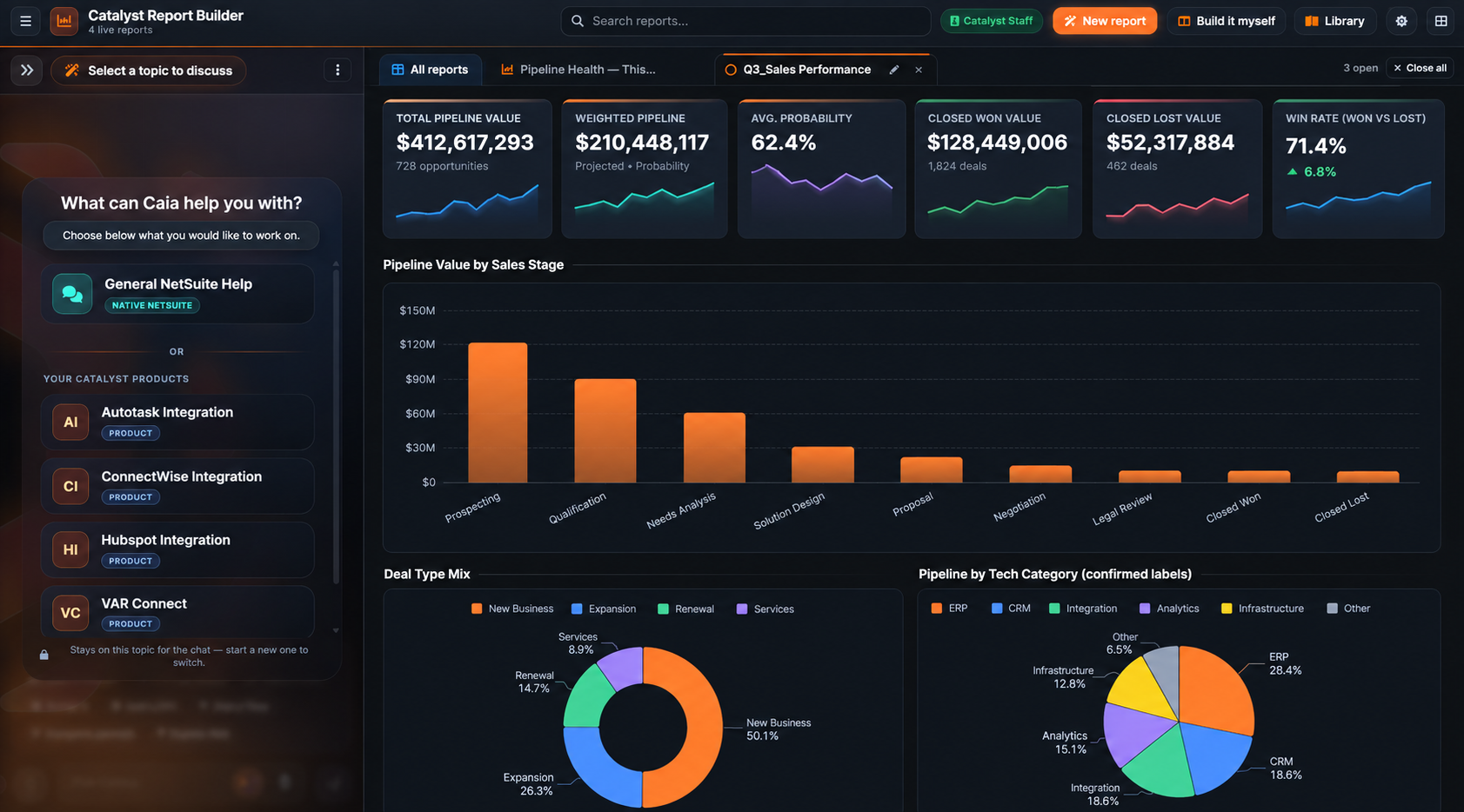
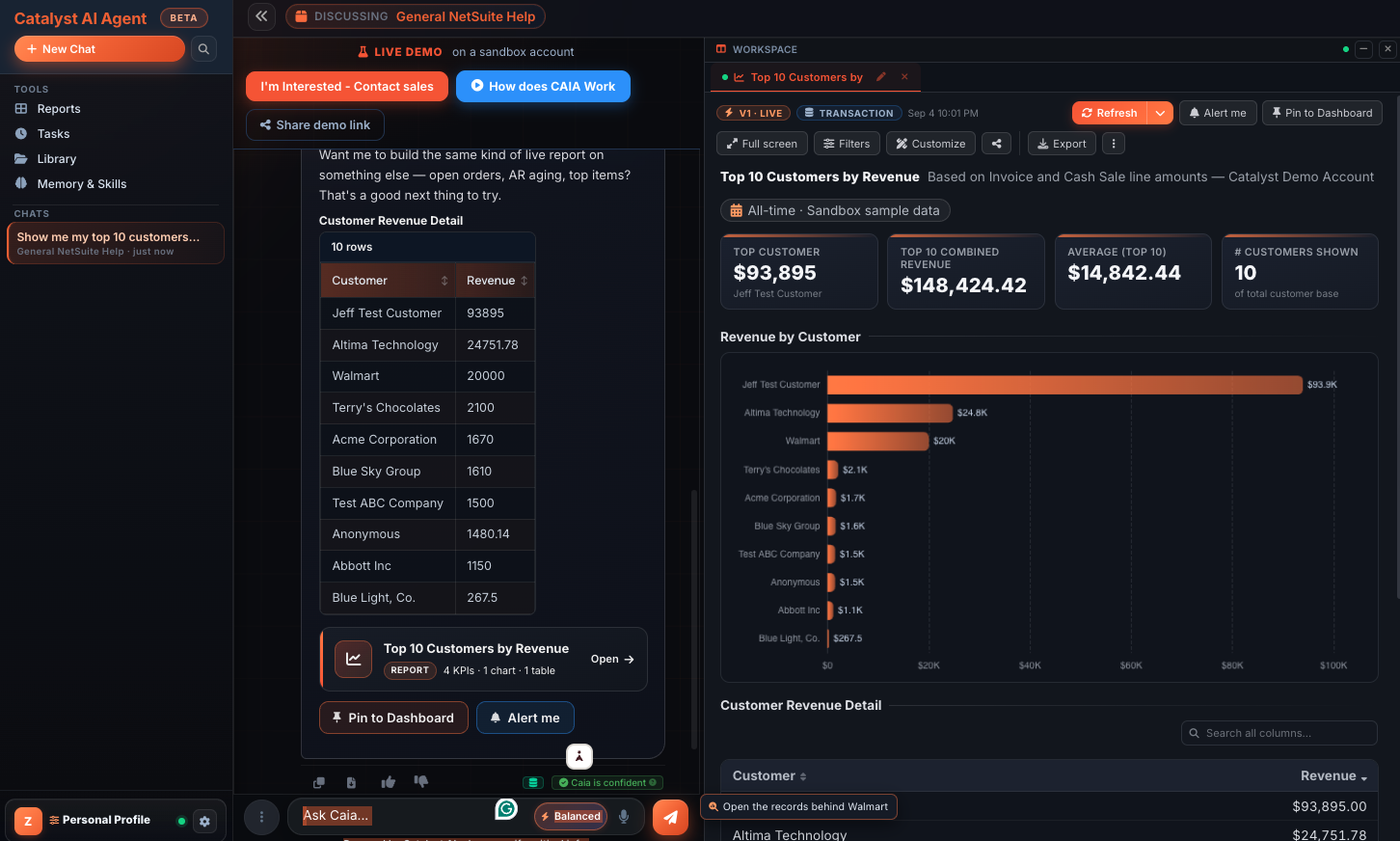
CAIA running in production inside the Catalyst Report Builder.
Voice + screen share
Live error debugging and walkthroughs on demand.
Call CAIA like you'd call a coworker.
One tap and you're in a full voice conversation. CAIA greets you first, listens with sub-second latency, and talks back in your language. Share your screen with one click and CAIA sees exactly what you see — reading the error dialog aloud, pointing out the field you missed, and walking you through the fix step by step.
The full transcript saves to your chat history when the call ends, so you can reference it later. CAIA can still run SuiteQL, search docs, and create saved searches — all by voice.
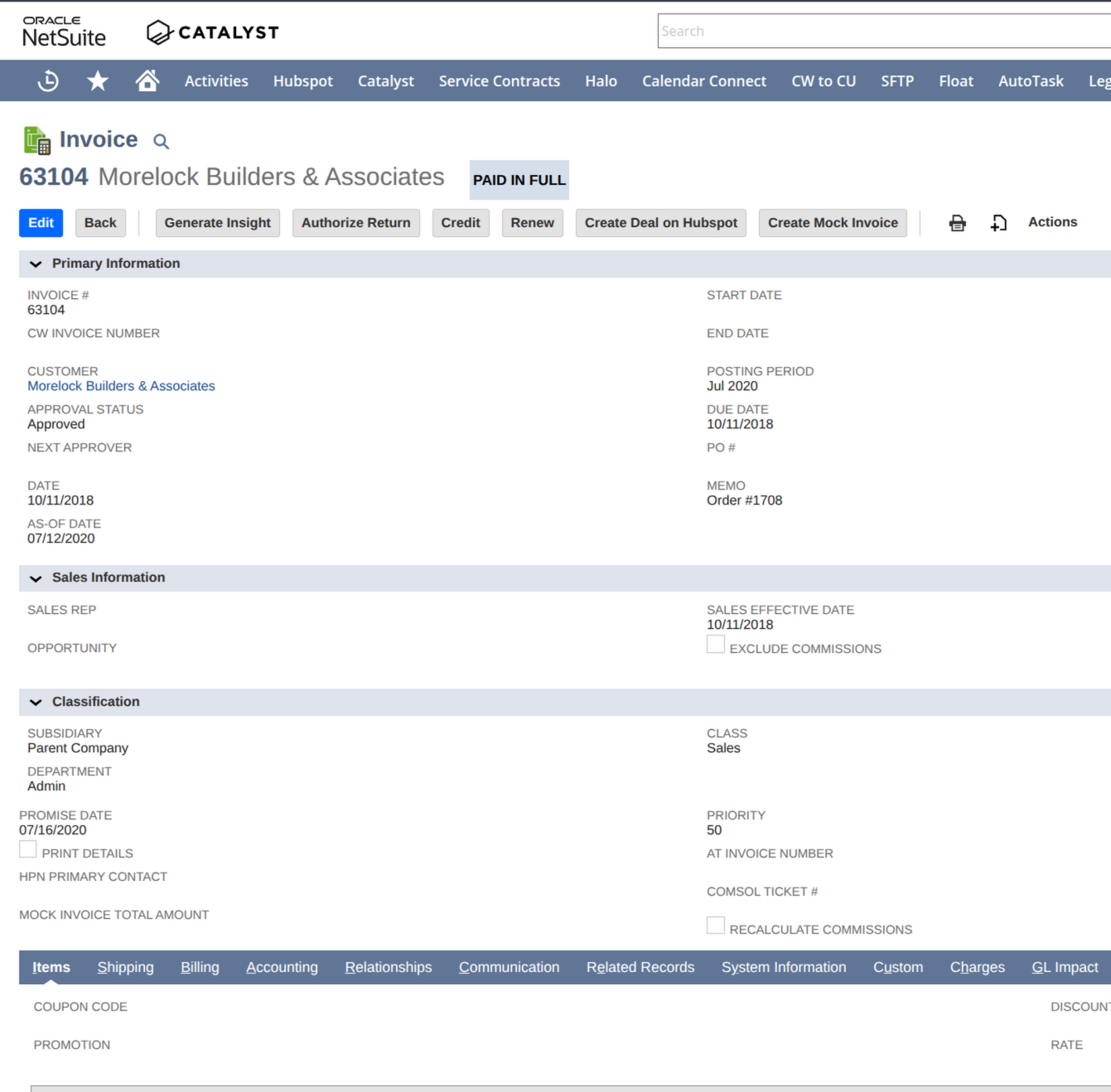
All goodApproved · Paid in Full · posting period Jul 2020
Heads upNo PO # on record — memo says “Order #1708”.
CAIAI'm on invoice 63104 — it's Paid in Full, but there's no PO number. Want me to pull it from the memo?
CAIA speaking
Superpowers
What makes CAIA genuinely useful.
CAIA is a NetSuite expert consultant and operator first — querying, reading, building, and driving your live screen side by side with you — and a deep Catalyst product specialist second. Every feature was built from real customer pain. Not AI demos. Not party tricks. Tools that move work forward.
A True NetSuite Expert — Native and Deep
Before anything else, CAIA is a NetSuite consultant and operator. CAIA knows the platform natively: records and transactions, saved searches and SuiteQL, workflows, scripts, roles and permissions, subsidiaries, accounting preferences, and the whole menu tree. Ask CAIA anything about standard NetSuite and it answers like a senior consultant, then does the work with you, not just points at the manual.
Why is this journal entry out of balance?Build me a saved search for overdue invoicesWalk me through creating an intercompany transaction
Also a Deep Catalyst Product Specialist
On top of native NetSuite, CAIA is trained on the full Catalyst product catalog: IT Distributor Integration Suite (VAR Connect), Connectwise Integration, ConnectBooster Integration, Autotask Integration, Halo Integration, HubSpot Integration, Channel Online Integration, Project Hub, Service Contracts, Sales Commissions for NetSuite, Automated Renewals Management, and the entire IT VAR bundle. Setup, configuration, daily usage, troubleshooting, edge cases: ask anything. Get expert answers in seconds, not next-day ticket replies.
How do I configure VAR Connect for a new distributor?Why is the Connectwise sync skipping certain agreements?Walk me through ConnectBooster month-end reconciliation
Live NetSuite Environment Awareness
CAIA auto-connects to your NetSuite account the moment it opens. CAIA sees installed scripts, bundle versions, enabled features, and custom records, turning generic “try this” answers into account-specific guidance.
Is our Connectwise bundle up to date?Is the approval script actually deployed?Show me my overdue invoices right now
The big one
Live Browser Operator — CAIA Drives NetSuite For You
The biggest leap yet. CAIA opens a real, logged-in NetSuite browser session and operates it like an expert: navigating to records, opening screens the API cannot even see, reading live values, and working multi-step tasks end-to-end. CAIA narrates every step as it goes, like screen-sharing with a senior consultant who actually does the clicking. Need a change made? With your explicit go-ahead, CAIA fills the fields and saves, then screenshots the result to prove it landed.
Open invoice INV-4821 and check the memo fieldWalk the approval screen and flag anything offUpdate the customer's terms to Net 30 — go ahead
Watch It Live + Instant Session Reports
You are never in the dark. A live screen-share streams exactly what CAIA sees inside NetSuite, with auto-highlighted screenshots and a step-by-step activity log scrolling right beside it. When CAIA is done, one click turns the whole session into a polished, branded PDF report: screenshots embedded, findings written up, ready to forward to your team.
Live screen-share of every clickKey fields auto-highlighted in screenshotsOne-click branded PDF session report
Direct Record Edits — Create and Update, Instantly
Beyond reading: CAIA writes back to NetSuite through the secure backend connector, no screen-driving required. Need a new record or a field changed? CAIA drafts the exact create or update, shows you a preview card with every body field and sublist line laid out, and writes nothing until you click Confirm. Native record types or custom records, header fields and line items: done in seconds, then verified back to you.
Create a sales order for ACME — 2x SKU-100Set the memo on invoice 12345 to 'Reviewed'Update this vendor's payment terms to Net 30
Saved Searches — Preview Before Create
Describe the report you need in plain English. CAIA writes the saved search, shows you a preview card with columns and filters, and lets you Run Search to test it or Create in NetSuite with one click. Nothing writes until you approve.
Open invoices over $10K with no POAll active employees in SalesOverdue purchase orders from Q1
Voice Chat + Screen Sharing
Tap the phone button. CAIA picks up in real time, greets you, then listens. Share your screen and CAIA sees exactly what you see, guiding you through every click with the live transcript scrolling beside it. Like pairing with a senior engineer.
Walk me through creating a new vendorWhat's on my screen — why is this red?Read the error dialog for me
Drag and Drop Screenshots
Paste a screenshot with Ctrl+V. Drop in a CSV. Upload an XLSX or a PDF up to 10MB. CAIA describes what it sees, reads the data, spots error patterns, and recommends fixes without you re-typing anything.
Here's the error dialog [screenshot]Why is this invoice rejecting? [PDF]Parse this customer list [CSV]
Builds Real Documents and Decks
Ask and receive. CAIA generates polished, downloadable files on the spot: Word, PDF, Excel, CSV, and full PowerPoint decks from your conversation or your data. Not a copy-paste of the chat: real, formatted, ready-to-send deliverables you can open, edit, and present to your team.
Export these findings to a Word docBuild a PowerPoint for the customer reviewGive me that list as an Excel sheet
Diagrams and Visuals On Demand
Need a picture, not paragraphs? CAIA generates clean diagrams, flowcharts, and illustrative visuals on the fly, then drops them straight into the Word docs and PDFs CAIA builds. Explain an integration flow, a process, or an architecture in one image instead of ten sentences.
Diagram how the Connectwise sync flowsSketch the approval workflowAdd a visual to that PDF report
Web-Grounded and Always Current
CAIA does not just lean on training data. When it matters, CAIA searches the live web and the official Oracle NetSuite documentation in real time, then cites what it found so navigation paths, release details, and best-practice answers reflect today's NetSuite, not last year's.
What's the current path to enable that?Check the official docs for this settingCited web + documentation sources
Dashboard Navigation GPS
CAIA knows Catalyst Dashboard paths and tells you exactly which breadcrumb trail to follow. No more hunting through settings.
Where do I enable auto-approval?Navigate me to license renewalHow do I get to the deployment log?
Smart Human Escalation
When CAIA hits a real product bug or reaches the edge of its confidence, it says so. One click raises a ClickUp ticket pre-filled with the full conversation, your NetSuite account context, the error log, and CAIA's diagnostic, so Catalyst engineers start at step 5, not step 1.
This looks like a product bug — escalate?Let me raise a ticket for youA human will take it from here
Dictation (Speech-to-Text)
Do not feel like typing a 3-paragraph question? Tap the microphone, talk naturally, review the transcribed text, then hit send. CAIA dictates in Chrome, Edge and Safari, perfect for long detailed prompts.
Hands-free message compositionReview and edit before sendingAppend voice to typed text
70+ Languages
Your teams speak what they speak. CAIA answers in English, Hindi, Portuguese, Spanish, French, Mandarin, Japanese, Arabic, Tagalog, and 60+ more — text and voice. No translation layer. Native responses.
¿Cómo configuro la aprobación?在哪里找到发货设置?Comment créer une recherche ?
Confidence Badges
Every response is tagged. "CAIA is confident" when the answer is straight from product docs. "CAIA isn't sure" when CAIA is reasoning or extrapolating. You always know how much to trust the answer.
✓ Confident → proceed⚠ Not sure → verify or escalate● NetSuite · ● Web · ● Files used
One-Click NetSuite Health Check
A consultant-grade audit of your entire account, on demand. CAIA runs a read-only multi-area scan: data quality, integration health, scripts and automations, saved searches, security and access, operational hygiene, and produces a fully-formatted report with a 0-100 health score, an evidence table, and a prioritized next-actions list. No consultant scheduling. No engagement fee. Just clarity.
Run a health check on my NetSuiteIs my account set up correctly?Scan for problems I might've missed
Document Studio — Word, PDF, Excel, CSV, PowerPoint
Ask and receive. CAIA builds polished, custom Word docs, PDFs, Excel workbooks, CSVs, and PowerPoint decks tailored to exactly what you need, not a dump of the chat, but a restructured, properly-formatted deliverable. Reconciliation templates, journal-entry upload files, executive readouts, board decks. Download in one click.
Build me an Excel upload template for vendor billsMake a PDF board readout of these renewalsGenerate a PowerPoint deck for the QBR
Bulk Mass Updates — With 24-Hour Undo
One identical change across dozens or hundreds of records, in one shot. CAIA shows you a plan card with before→after samples and record counts, nothing runs until you confirm, and larger batches ask you to type UPDATE to acknowledge. Live progress with Pause / Resume / Cancel, plus a full 24-hour Undo button if you change your mind.
Set status to Closed on all these SOsMark these 40 tasks completeUpdate payment terms on all Ingram vendors
Wins on both sides
Better for users. Better for admins.
For Daily Users
AP · AR · controllers · ops · sales
Answers in seconds, not days
No more waiting on support tickets. Ask CAIA, get a streaming answer before you finish your coffee.
Plain-English explanations
No stack traces. No jargon. CAIA explains the why so next time you'll know.
Navigation you can follow
Exact menu paths. Step by step. CAIA walks you to the setting, not just tells you it exists.
Onboarding new staff painless
Your junior clerk asks CAIA the same question 40 times. CAIA never gets tired. Training costs drop.
Works weekends and nights
Month-end close on Saturday? 2 AM emergency? CAIA picks up instantly. Every single time.
For NetSuite Admins
IT · admins · controllers · champions
Fewer "quick questions" from users
80% of support Slacks vanish. Users ask CAIA first. You get your focus time back.
Saved searches on demand
Team keeps asking for new reports? Send them to CAIA. CAIA builds it with a preview — you approve, CAIA creates.
Everyone on your team gets the same accurate guidance. No more "well Sarah said..." vs "but Mike said...".
Tenant-isolated, NS-auth-respecting
CAIA respects your NetSuite role permissions. CAIA only sees what your login can see. No data leaks between customers, ever.
Measurable impact
The numbers from our first wave of customers.
Conservative early measurements from CAIA beta customers. Every metric improves as CAIA learns your environment.
92%
Questions Answered Without Escalation
Only 8% needed a human touch
4 sec
Average Time to First Answer
vs. 6.2 hrs for ticket queue
74%
Support Ticket Volume Drop
Across beta customer cohort
3 hrs
Saved per Admin per Week
"Quick question" interruptions gone
24/7
Coverage — Zero Gaps
Weekends, holidays, month-end
68%
Onboarding Ramp Reduction
New staff productive faster
In their words
What people actually say about CAIA.
Aggregated from real CAIA beta user feedback. Names changed, sentiments verbatim.
”
We close books on the last Saturday of every month. The first month we had CAIA, I didn't text our IT guy once. First time in eight years.
”
Our new AP clerk asked CAIA "how do I enter a vendor bill?" sixty-seven times in the first month. CAIA answered sixty-seven times without complaining. I did not answer it once.
”
The saved search thing is wild. I said "show me overdue POs from Ingram over $5K" — CAIA showed me a preview, I hit Run, then Create. Sixty seconds. Used to take me an hour.
”
I called CAIA on voice during a board prep panic. CAIA screen-shared, spotted the missing GL mapping, walked me through the fix while I clicked. Seven minutes, crisis over.
”
Mi equipo en São Paulo habla con CAIA en português. Mi equipo en Denver en inglés. Misma respuesta, mismo día. Es como contratar a diez traductores gratis.
”
When CAIA finally escalated a ticket to Catalyst, it had everything — the conversation, our account setup, the error logs, and CAIA's diagnosis. Catalyst fixed it same day. First time that's ever happened.
Security & Trust
Powerful, never reckless.
CAIA is read-only by default, tenant-isolated, permission-respecting, and will never display credentials — even if they exist in your account data.
CAIA Can
See your company name, account ID, and NetSuite role
Check which Catalyst scripts and bundles are deployed
Query records your role has access to (SuiteQL, read-only)
Read files in your File Cabinet (within your permissions)
Create a saved search — only after you click "Create in NetSuite"
Open support tickets on your behalf (with your approval)
CAIA Cannot
See or display passwords, API keys, or OAuth tokens
Access any other customer's data — fully tenant-isolated by your NetSuite account
Modify, create, or delete records (except approved saved searches)
Exceed your NetSuite role's permissions
Share your conversations with anyone outside your org
Run destructive commands — all write ops require explicit consent
The honest FAQ
Questions everyone asks us.
Is this going to replace my support team?
No. CAIA handles the repeat 80% — the "where is this menu?", the "why is my invoice failing?", the "what does this field do?" — so your humans focus on the hard 20%. Support teams get more effective, not smaller.
Can CAIA change NetSuite data?
By default, no — CAIA is read-only. The one exception is saved searches, and even those require you to click "Create in NetSuite" after reviewing the preview. Every write action requires your explicit consent.
What if CAIA gets it wrong?
Every response shows a confidence badge. "CAIA is confident" means docs-verified. "CAIA isn't sure" means CAIA is reasoning — verify or escalate. Every response also has a 👎 feedback button we actively monitor.
Does CAIA cost extra per user?
Pricing details can be covered during your demo, once the team understands your NetSuite environment and Catalyst products.
Does CAIA store our chats?
No. Your conversations are private. We respect your data privacy and do not retain chat content for our own use — not for training, not for analytics, not for sharing. What you say to CAIA stays between you and CAIA.
What NetSuite permissions does CAIA need?
CAIA respects your login's role. If your NetSuite user can see a record, CAIA can see it. If not, CAIA can't. No elevated permissions. No admin bypass.
How do I get CAIA?
If you're already a Catalyst customer, your rep can enable CAIA on your account in under an hour. A new menu item appears inside your NetSuite — click it and CAIA is ready.
Put CAIA to work
Put CAIA to work in NetSuite.
Start with the workflows, questions, and support load your team keeps working around.